Controls::Examples
Caveats
Most if not all pages are just rough notes, and these pages as a whole are far from complete. More notes will be added in time, eventually, maybe.
If, from reading these notes, you conclude that I am off my rocker, you won’t be the first, and you may even be right. These pages may simply position me as an acolyte to the late Gene Ray.
No doubt there are a dozen and one reasons why none of this would ever work, but perhaps somewhere deep down there is a tiny fragment that could be used for something.
Desktop operating systems have a history of lacklustre and unintelligent control design. This was greatly exacerbated by HTML whose available control types are even more limited. A poor control suite either leads to endless reinvention (in the form of controls that don’t have native appearance or behaviour, especially with keyboard navigation) or programs that are needlessly difficult to use.
The “new” Event Viewer in Windows introduced a truly dreadul control for filtering on event sources: a dropdown menu with endless pages of entries and no search or filter. While you technically can manually enter the name of an event source, unless you physically tick one or more items, whatever you type is thrown away. This is a perfect example of a situation where the control suite needed a proper control introducing that everyone could use: this is very far from the only situation where one needs to choose one or more items from a long list. Microsoft’s chief apologist’s typical excuses of backwards compatibility or brain-dead developers don’t hold water as this was a new utility exclusive to a new version of the OS, therefore no reason not to add the relevant features to the UI.

COMET’s database viewer has an interesting sub-sort implementation, discovered after documenting sub-sort here. The initial column sort is indicated by a number 1 in a triangle; the number 1 is a visual clue that sub-sorting is possible. Control-clicking on a column heading adds that column to the sort; a second click sub-sorts by that column in reverse order, and a third click removes it from the sort.
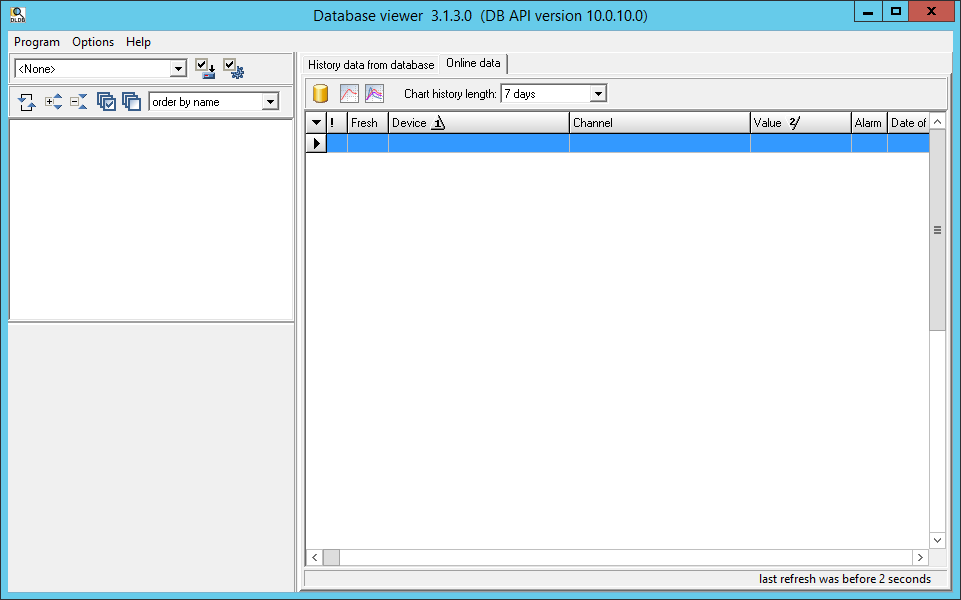
The appearance is somewhat cumbersome, and the question remaining is whether it is possible to have a more subtle way to offer the same level of intuition to the user. (Note that the screenshot and description are of an old version of the software discovered on a server and do not necessarily reflect the most recent version of the product.)
Another approach used on the web is to have “Add to sort” and “Remove from sort” added to the dotdotdot menu for each column heading. (Seriously, don’t design interface controls with symbols that most people don’t know the name of.)