Command line
Caveats
Most if not all pages are just rough notes, and these pages as a whole are far from complete. More notes will be added in time, eventually, maybe.
If, from reading these notes, you conclude that I am off my rocker, you won’t be the first, and you may even be right. These pages may simply position me as an acolyte to the late Gene Ray.
No doubt there are a dozen and one reasons why none of this would ever work, but perhaps somewhere deep down there is a tiny fragment that could be used for something.
Contents
Command line processing
One “excuse” for command line syntax being so erratic is the lack of any official mechanisms for describing, parsing and processing the command line. By incorporating these tasks directly into operating system, this frustrating ambiguity and confusion can be laid to rest. Traditionally, the command line is passed directly as a string and received by the program code as an array of strings. Interpretation of these strings as options, filenames etc. is left to the program code to figure out.
An alternative solution is available by way of a combination of the application’s manifest and the Native Event Model. The application’s manifest would define its command-line interface, and the operating system would transform the command line into a structured event containing all the parameters as fields, akin to receiving a C struct. The idea of the shell understanding the syntax of each command is covered by Alexandra Lanes on a page describing a related concept, one that does seem to now be present in Linux. Her idea of using “?” to request clues is a feature of Cisco IOS. The application manifest will contain the program’s command line specification that will make such ideas possible for any command.
This in turn would resolve the confusion and pain surrounding file globs. File globs already cause confusion in that, depending on the environment and the command, the shell may or may not parse a wildcard string and replace it with a list of matching files. Further, the amount of files returned may exceed the permissible length of the raw command line string. Acorn’s decision with their Disc Filing System (DFS) was to define command line parameters as “<fsp>” and “<afsp>”, denoting “file specification” and “ambiguous file specification” respectively:
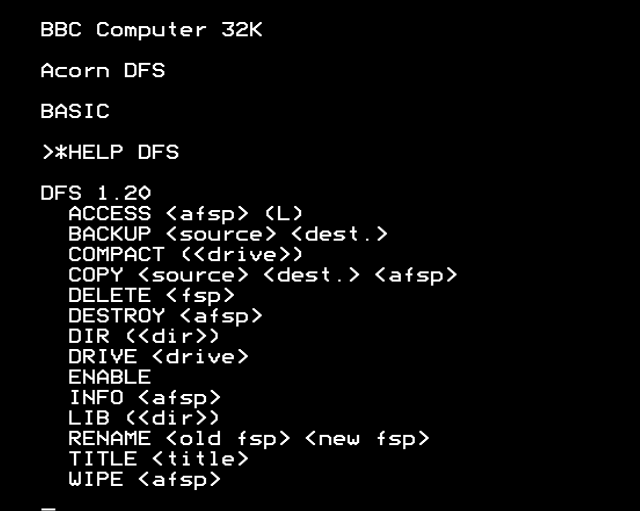
A “file specification” is a filename or a partial or full path to a single file. An “ambiguous file specification” is a filename or a partial or full path that may contain wildcards to specify multiple files. By defining the behaviour directly in the parameter, the system can determine exactly when a list of multiple files is to be expected.
Consider the AppleEvent system introduced to the Mac around 1993. A resource within the application (of type “aete”: AppleEvent terminology extension) defines all the scripting commands that a program understands and the conversion from human language terms (normally in English) to internal parameter IDs. This includes the initial event passed to the application, one of “oapp” (application is being launched directly), “odoc” (a list of files to be opened by the application) or “pdoc” (a list of files to be printed by the application). The application manifest will allow the command line to be treated in the same manner: parsed by the OS and converted into the first message fed to the program upon launch.
File globs themselves can either be “eager” or “lazy”. An “eager” file glob requires the OS to parse the parameter and embed a reference to every single file within the message, which can be expensive if many items are returned. A “lazy” file glob is one that resolves the query only on demand. If the program never reads the parameter, no look-up is performed. As the program iterates over the parameter, the system locates more files that match accordingly; this allows an unlimited number of matches without any overhead. Which of these (or both, according to either context or specification) gets adopted remains to be decided.
Syntax
Command structure
Sub-commands should also be either formalised or proscribed. Sub-commands are where a single executable can perform multiple tasks, by way of a token on the command line that resembles a file but isn’t. For example, in the following command, “genrsa” is a subcommand and not a filename or an argument:
openssl genrsa -des3 -out domain.key 2048
More troublesome, “-des3” (use Triple DES cipher) technically means “-d -e -s 3” (three separate options) but there is no consistency with historic commands and OpenSSL is using long options with a single hyphen-minus. The netstat command in Windows accepts bundling just as with Linux, making the following commands equivalent:
netstat -an
netstat -a -n
Despite this, and despite the more general Linux convention of using a double-hyphen-minus for long options, PowerShell adopted a single hyphen-minus while using exclusively long options, furthering the confusion.
Calling applications
From a user perspective, the command line is a single line of text, with whatever niceties get included, such as syntax hints, parameter completion etc. The operating system is responsible for converting this to EVENT_COMMAND_LINE, launching the application and passing it the event record.
From a programmatic perspective, however, calling command line programs in this manner is ridiculously painful and fragile. Shell processing required for file globs results in bugs from special characters. Spaces in paths cause no end of trouble.
Command-line programs will instead be called by something vaguely like:
params = (new SystemTypes::CommandLineParameters)
	.positionalInt(50)
	.positionalInt(100)
	.namedInt('threshold', 85)
	.namedFile('log', 'foo processing')
	.namedBool('datestamp-log', true);
System::startProcess('foo', params);
This command will fail immediately if the program in question cannot accept the parameters specified, rather than having to figure out the exit code or scrape the output.
No string building is required, nor any escaping of parameter values. The parameter values will never even see a round trip through a string: the parameter set will be converted directly into the command line message.
Shell
PowerShell raises a lot of questions about how a shell should function. PowerShell is undeniably very powerful, but it is also a complete abomination. The Native Event Model will intentionally allow pipelines to carry machine-readable messages just as PowerShell pipelines do. Pipelines that cross the event model boundary will see the messages converted between objects and plain text and vice versa. The huge problem with UNIX is that so many management tools produce exclusively human-readable output, which is ridiculous. Shell scripts are required to scrape this output. The output cannot be amended in terms of format, including localisation to another language, as that will break the fragile text parsing used to get the data out. As such, management tools will produce machine-readable output foremost, with the option of human-readable output if the final item in the pipeline is the user’s terminal. (PowerShell is as dreadful at providing anything useful to humans as POSIX systems are at providing anything useful to a practical toolchain pipeline.) Automatic conversion to plain text will be attempted if the program does not do this automatically.
The more interesting question is whether the command line system should be extended to cover parameter types beyond those of basic human input and, if so, in what manner. This would require the shell to be elevated in concept to a fully object-orientated language as was done with PowerShell, but in a manner that is actually comprehensible and well-defined, instead of random, erratic and inscrutable.
The design of the command line and the shell is going to require a lot of thought.
OS calls
There are lots of situations where it is useful to be able to invoke a specific OS call. Under Microsoft Windows, you can sometimes do this:
Rundll32.exe user32.dll,LockWorkStation
This is ugly.
Acorn’s BBC BASIC V on the Acorn Archimedes permits calling any OS SWI (software interrupt, the OS calls in RISC OS) with the SYS keyword. For example, the following two calls enable the hourglass cursor and put a progress reading of 05% below it:
SYS "Hourglass_On"
SYS "Hourglass_Percentage", 10
PowerShell gets incredibly messy the instant that you step beyond the named cmdlets, yet making OS calls from RISC OS in BBC BASIC is easy. The SYS command places up to eight parameters into ARM registers R0 to R7, with integers stored as-is, and strings passed as pointers. Unspecified parameters set the corresponding register to zero. The optional sub-keyword “TO” stores the contents of registers R0 to R7 into the variables given.
Notes from other systems
These are not suggestions, just an indication that what you are accustomed to is not the only approach that exists.
Acorn MOS
- There is no command history, but pressing one of the cursor keys splits the cursor; the cursor keys move the split-off cursor around the screen, and the Copy key copies whatever character is under the split-off cursor and types it into the command line, and increments the split-off cursor position.
- Both the OS and BASIC commands can be abbreviated, for example *EXEC to *E. and *COPY to *COP. (which saves all of zero keystrokes). *CAT can be abbreviated all the way down to *. hence the name of the stardot.org.uk website.
Tripos
- Output into a console window is suspened once the user has started entering a command. On clearing the command line (Ctrl+X to erase the current input, or repeated backspace keystrokes), all pending output is shown, as it would be after issuing a command.