Case Study 4 - Explorer page 2
Explorer is so dumb that I decided that it would get a page all to itself for its non-file-system-related tasks.
I don’t know what triggered the following scenario, since Bugout won’t run windowed:

What I wonder, is what happened to the taskbar:

The taskbar can be dragged to either side of the screen, so this layout is not an impossibility, but just a very bizarre state of confusion:

These pictures date back to my previous Windows 2000 installation where it had lost the ability to draw icons above 4-bit colour.
Not all Windows software automatically adds itself to the Start menu, be this a blessing or a curse. Of the many things absent from Mac OS X is right-drag (along with cut and paste in the Finder). You can right-drag an item to the Start menu and ask to create a shortcut to it, but always end up foiled by a tooltip permanently lodged in your way:

Is the following taskbar button in its active state?

FileNotFound.
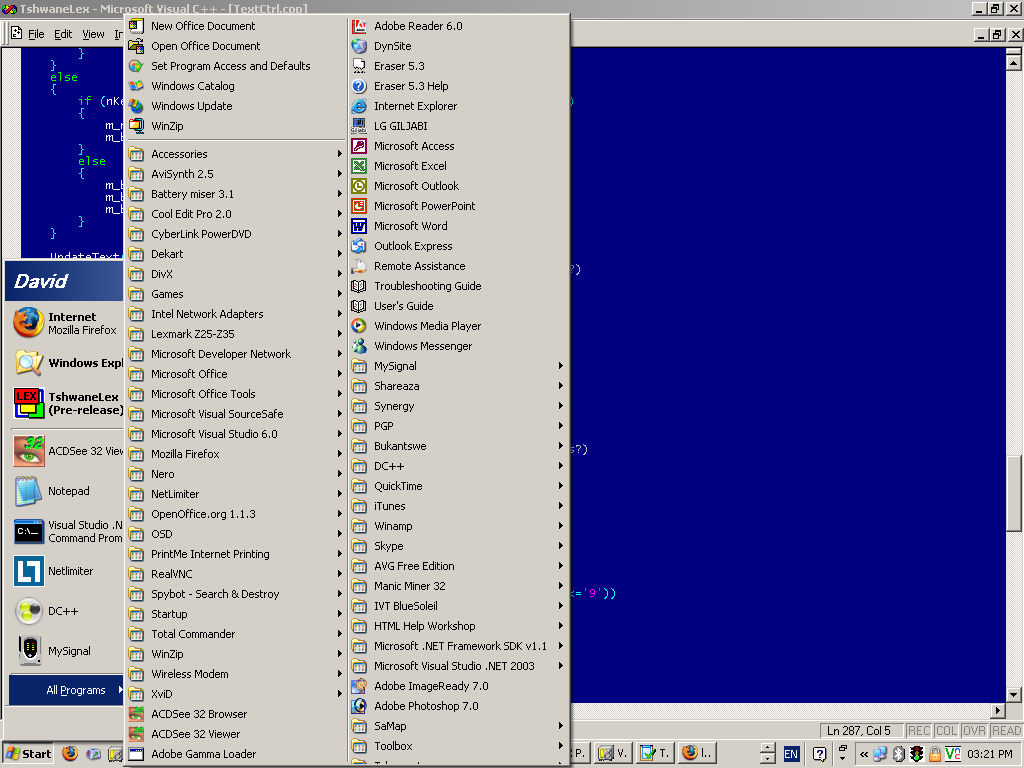
David Joffe had something of a problem with the Start menu opening taller than the display, on 2005-04-04:

Also on 2005-04-15, and 2006-08-08 on a larger monitor.

Another example of Explorer assigning the wrong icon to a taskbar button (the License Warning dialog comes from the License Logging service, not F-Secure Anti-Virus for Windows Servers):

One server has a very bizarre problem where the Quick Launch folder remains unreadable to the taskbar, even though via a folder window you can read from and write to the folder just fine:

The cause of the problem might be considerably clearer, were Microsoft to ever implement a programme of writing meaningful error messages. Apparently I “may not” have the appropriate permissions. This server is a domain controller, so I don’t know what higher authority I should seek when the domain controller itself can’t determine whether I have read permissions to the active profile or not. I should be grateful that I was not simply advised to close the drive door.