Other GUI oddities
Firefox, as well as being renowned for being a memory hog, also loves eating CPU cycles unnecessarily. Here, I had suspended it using Process Explorer and later resumed it. It is too busy recovering to draw in its window (got to make up for all that lost CPU time!) but, why is the window now marked as if it were minimised?

This is an old problem that used to plague me a lot: the Apple menu recursing ad boredam:

In FlashFXP, if you switched off the queue pane, the status display would run and hide:

I forget what happened here; it was something to do with a dialog box from Psion MacConnect showing up while I was dragging something in the Finder:

Look carefully at the following Netscape “crash” experienced by a former colleague, John Corbett.

How comes parts of Netscape are drawn on top of the crash dialogs? I was there at the time but I don’t know what was going on.
More Netscape: here is their dreadful AIM client:

Click the toolbar collapse box next to the main toolbar and it acts weird:


And yes, it is completely unable to memorise my text colour. That two of the three main toolbar buttons are Warn and Block says a lot about Netscape’s perceptions of their userbase.
AthenaIRC’s scroll bar is neither up nor down:

The next picture is a full-screen screenshot. No, really.

It was supposed to be screenshot of a C runtime exception dialog in Icon Machine but that is all screenshot file contained.
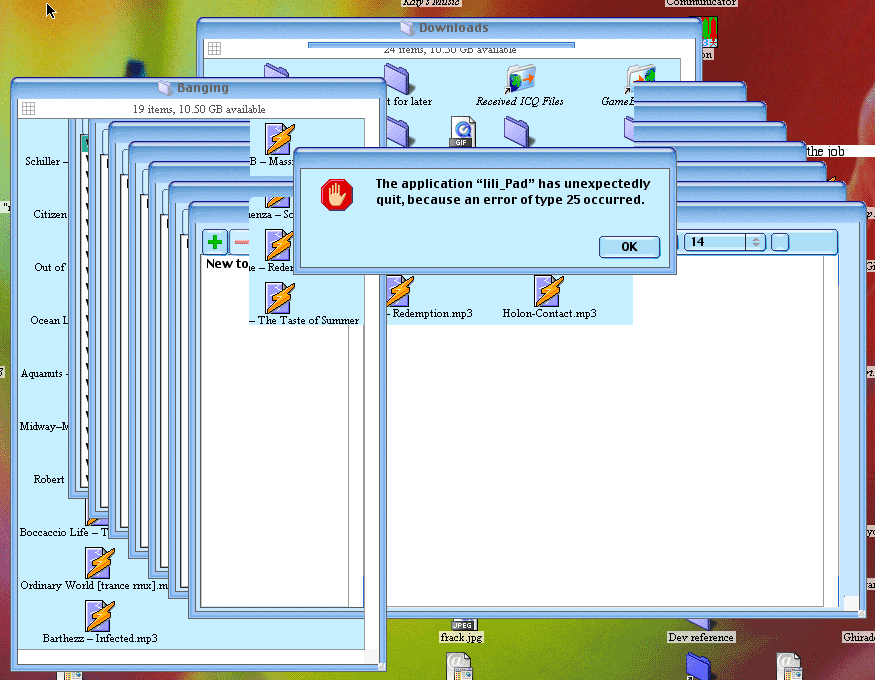
The next picture is me baiting my lili_Pad: opening more and more windows until it crashed. The odd thing is that when it did die, the screen was not redrawn in as its windows were closed by the kernel, littering up the screen: