For a brief moment in time, Mark Pursey resumed development on JujuEdit; a few bugs got fixed, and the application was slowly on its way to being fully Unicode-aware. Then, as suddenly as it began, it ended, Windows being ditched in favour of the Mac, with JujuEdit placed once more in the great recycle bin of time. Archived below are the entries from the bug tracker hosted at FogBugz. (Where this all came from remains a mystery.)
All are reproduced verbatim (without any embellishment or revision) with the exception of a few character upgrades (most notably “smart quotes”).
File → Open defaults to text files, which is relatively impractical because most files edited using JujuEdit won’t be .txt files.
It would probably make sense to start out with All Files selected and allow the user to filter for a specific type as and when desired.
It would be nice if the file type filter list was taken from the configurations list. However, configurations use regular expressions for type matching (e.g. “\-\- tracklist.txt$” for all my DJ mix tracklists [1]) which makes things a little awkward!
[1] The backslashes are there to stop JujuEdit associating the files with Winamp Playlist (.m3u) instead. No idea how that happens.
Despite being a dear and trusted friend, JujuEdit is still wearing a tank top (sweater vest), dress shirt and old thick-rimmed spectacles.
Will 1.5 / 2.0 still be supporting Windows versions that only take 4-bit toolbar icons? How much trouble would it be to move to 32-bit or autoselect the appropriate bitmap set?
What I’d like to do is retouch all the toolbar icons to 32-bit, keeping the same style but just increasing the depth and providing anti-aliasing. As in make the program look like 2000 instead of 1993.
Personally I get very wary when programs get redressed as typically the glorified new looks cover up the lack of changes/fixes (cf Mozilla Thunderbird), and I find it comforting when a program looks the way it always has done, as it suggests that effort has gone into making the program better instead of the more common political reshuffle where the program has been “sanitised”. I upgraded -- at cost -- StuffIt Standard for Windows (due to crashing bugs expanding some archives) and every trace of goodness was stripped out of the new version making it worthless to me. Every version of MS Office is prettier than the last but there are precious few, if any, realistic features in Word that weren’t around in Word 6. Most people now can’t even use Word to the level that it was at in version 6, 17 years ago (nested bullets and numbering, style sheets, document overview, master documents, basic DTP support, widow/orphan control, revision tracking, OLE, page and section break, columns, tables (stop using tabs for columns dammit) etc). The price of Word now does not justify people using it as a ridiculously overpriced, blind swap-in for Wordpad.
However, 32-bit icons wouldn’t go amiss. A lot of people would undoubtedly want the old icons completely ripping out and stamping on. Certainly if the icons need to be externalised, icon sets would be very easy then -- IrfanView, FlashFXP, FileZilla in particular support swapping the icon set and in none of those do I run the default icons.
</inappropriate-ramble>
Steps to reproduce:
The character (“a”) is replaced with an “unknown/missing character” square.
Cancel the dialog, and type Alt+0151 again -- observe that you can type extended ASCII/Unicode characters normally. It’s only Find and Replace where they don’t work, possibly because the Find and Replace fields are not Unicode aware.
When Perl reports a line in a script as having an error or warning, I will use Go To to reach that line. It’s not uncommon for Go To to be ten or more lines out. If I switch on word wrap and then back off, this forces JujuEdit to fix its internal state and then Go To works correctly. These are quite long files with thousands of lines. Unfortunately I’ve never seen a specific pattern to this other than that I simply must remember to flick word wrap on and off, especially when I’ve picked up a crashing line from caller() and don’t know which function failed. It’s most confusing when you’re looking at a line of code that could not POSSIBLY have caused the crash.
(TRWTF™ is Perl’s crash handling and lack of stack trace etc ;) Or maybe TRWTF est moi.)
JujuEdit is an SDI application. SDI applications do not have Window menus, therefore I am largely blind to the existence of one in JujuEdit, because my brain tells me that one doesn’t exist.
Now, I am fully in favour of using it, but when I’ve tried, I’ve been held back by an intermittent fault whereby not all windows show up. I use FileZilla SFTP to work with a Linux server, and double-click files in FileZilla to open them for editing, and FileZilla then monitors changes and prompts to upload each time.
When I check the Window menu on these windows, they often miss numerous other JujuEdit windows. I have never spotted a pattern yet, only that it’s not reliable. If I’ve opened, say, seven JujuEdit windows via FileZilla, I may see as few as two in some of the Window menus.
I don’t know whether there are some obvious bugs in the code or whether this is going to require debug code that logs into the JujuEdit runtime log file what it’s doing to see whether anything unusual shows up for the affected processes.
An update -- I current have open seven JujuEdit windows, with two parents: filezilla.exe, explorer.exe. I just started another JujuEdit process via FileZilla, and the Window menu contained only two windows.
As I went around all the JujuEdit windows opening the Window menu on each to see what it saw, they all started “self-healing” and the menus started showing more and more items until all windows showed all seven items in the Window menu.
Allow find/replace in multiple files
I’ve attached a couple of screenshots of how BBEdit handles batch find. The Find dialog box has syntax highlighting for regular expressions and a LOT of other features. It’s a tricky one because part of JujuEdit’s appeal is its great minimalism instead of feature creep and bloat.
The results window is even more impressive, and I’ve never seen another program do such a nice job of search results.
Having already developed a separate tool for batch regular expression processing, I would tentatively suggest creating a new program JujuFind or JujuGrep to supercede Batch-RegEx, and move all of this heavyweight interface complexity into it. Right tool for the job.
The trick here is finding the right balance between the bare bones simplicity of Batch-RegEx, and the overkill complexity of RegEx Buddy.
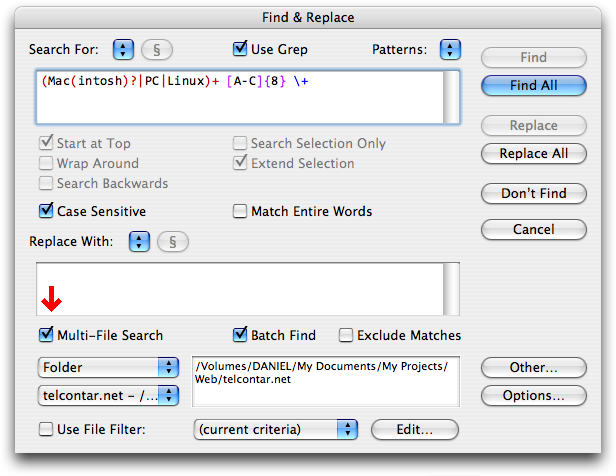
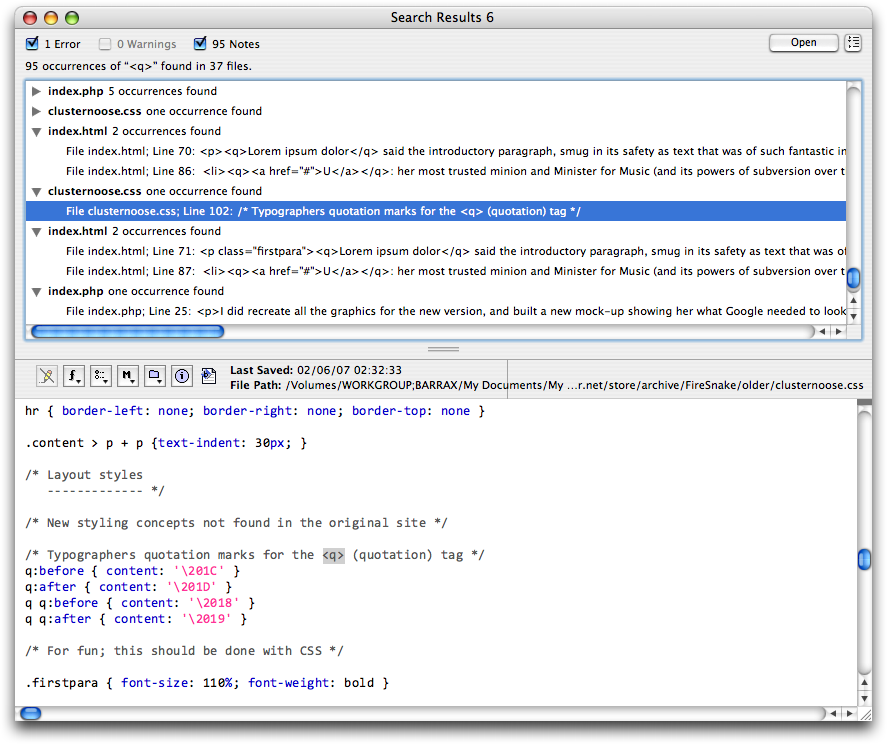
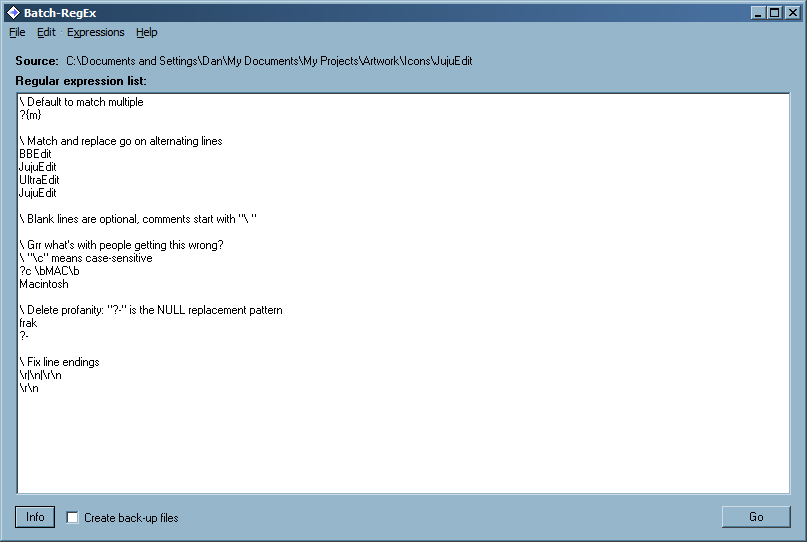
I’ve attached a screenshot of Batch-RegEx with annotations as the web page doesn’t really detail how it works.
I’ve attached another to show how I imagined it would be with highlighting.
It could also do with a preview mode to catch mistakes, and a panel to show all the files and folders to be processed (like a Mac OS X drawer). Right now, you can process one file, folder or selection by dragging it onto the source field. There is on ability to filter the names of the files within the folder, nor to recurse.
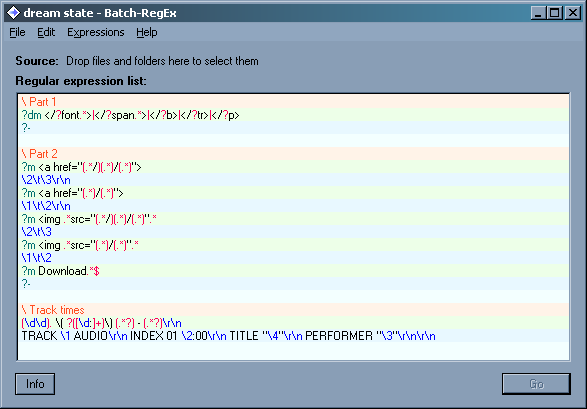
You could also have multiple find criteria, like:
find me

+find me

+find me too

-skip me

*highlight me if I exist
The search would find and highlight lines that match the NULL term and + term (highlighted separately) and skip lines containing - terms. Terms marked * would be flagged if they’re present, but are not mandatory. This is much, much, much easier than writing long, complicated expressions to ensure that multiple, non-adjacent terms exist in a line, and allows you to highlight them separately for clarity.
Only the NULL term’s capture groupings would be candidates for back-references.
Obviously if any of the terms contain \s, \r, or \n, things get a little confusing because you no longer have a meaningful scope within which to search for additional terms.
Need the means to stack multiple find/replace for doing repetitive text processing (and save named sets for future use)
This is what I wrote, which may serve as a good example of what not to do:
http://telcontar.net/Software/Batch-RegEx/
Limitations include the inability to specify a file extension or extensions or a pattern match for filtering files to process, no preview, and no recursion into subfolders.
Milestone 1: implement sort UI. This means the creation of Tools > Sort Lines > Ascending, Descending. These two commands will sort either the selected lines, or the entire file depending on whether there is a selection. At this stage, sorting may necessarily be ASCII only.
Milestone 2: use a Unicode library to implement international sorting.
Milestone 3 (optional): implement regular expression and character-delimited sorting. Regular expression sorting (as found in BBEdit on the Mac) allows you to sort on a string containing backreferences (e.g. “\3\1\4”) captured from a regular expression executed over each line. This is OPTIONAL :P
One of the advantages of JujuEdit is its very minimalistic approach. I don’t want to see the program get too much feature creep. However, one thing that I feel would make it subtly but significantly more usable is a node selector menu for documents.
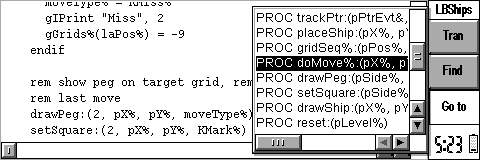
I’ve attached a couple of screenshots of BBEdit where I used to have this facility (I never use my Mac now).
In BBEdit, file types (what JujuEdit calls configurations) were all but hard-coded, and non-editable.
In JujuEdit, I would imagine that the node selector menu would, for now at least (as it could get quite sophisticated) be nothing more than a simple extension of the hightlight engine. Instead of regular expression matches being “replaced” with colour codes, they’d be used to specify which strings within the file represent nodes.
Getting this to work for CSS and HTML (as BBEdit supports) would be hard, because CSS selectors are a little hard to pin down, and HTML heading elements (h1, h3, h4 etc) can contain multiple lines, spans, divs, anchors, images etc within the confines of the tag, so extracting the name of the heading for the menu will be hard.
By comparison, Perl (which I develop in) is easy as you just look for anything starting “sub”, ditto “function” for JS and PHP.
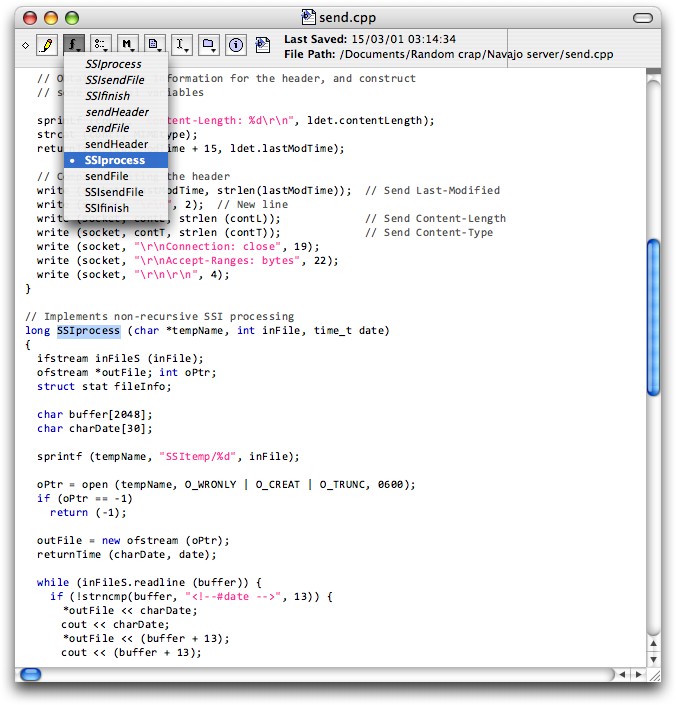
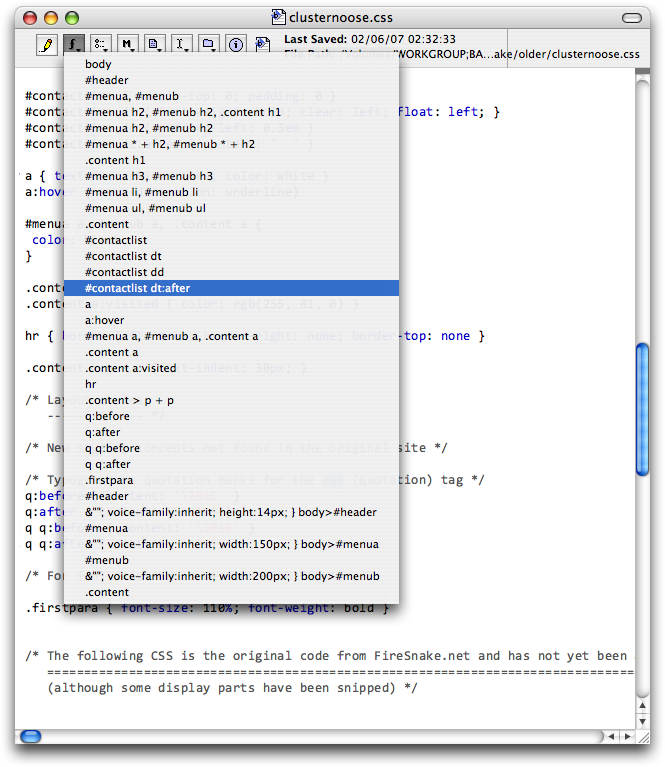
This is meant primarily for HTML pages, because they contain nested languages.
HTML files may contain:
<style type="text/css"> </style>, which can also be found in .css files<script type="text/javascript"> </script>, which can also be found in .js files<?php ?>, which can also be found inside .php and .inc filesThis calls for an additional feature of the syntax highlight system: rule nesting.
For example, take CSS. A rule shall exist to which .css files are mapped. This is for standalone files.
For HTML files, the <style type="text/css"> </style> tag also brings in this ruleset. The syntax could be something like this, defined in terms of the present regular expression system:
|<style.*?>(?"CSS"\=c)</style>
(?"...") matches /[\r\n.]*?/ and the complete match expression is processed as a separate document in the context of the specified configuration. (BTW, the term “configuration” is a little too vague and inspecific.)
The “\=...” optionally defines a background colour to place behind all the matching text to aid in demarcation. Only the
background attribute is read from the colour code, not the foreground colour or style attributes.
It is likely however that by version 2, the colour specification system will be redesigned, which is ideal here in order to be able to specify a much paler shade than normally permitted, to minimise the visual interference while clearly showing the areas of the document that are in another language.
Win32 is awful, time to improve configurability and portability by outboarding menu and hotkey assignments
Need triple click behaviour for line selection
When pressing F2 to jump to a bookmark, the window is often scrolled such that the bookmarked line is the first or last line of the window (depending on whether you’re scrolling up, or scrolling down). This means that you cannot see half of the context of the bookmarked line.
Therefore it would make the most sense of the line were to be centred within the window wherever possible (providing that the document can be scrolled up or down that far).
JujuEdit does not implement middle mouse scrolling, that is, where clicking middle mouse brings up a little circular indicator with arrows in, and moving the mouse away from this circle scrolls in that direction.
taking care of
file extensions
all files openable from context menu (replacing jjshext as per case 12)
if possible properly sign the thing to avoid "Unknown Publisher"
Undo presently considers every single keystroke to be its own undo state, which means that undoing a set of changes is very slow and tedious.
The conventional behaviour is to roll keystrokes up into undo states -- I’ll leave it as a developer excise to determine/decide when to start a new undo state as I don’t actually know. One example is where typing changes to backspacing or vice versa; another is when the insertion point is moved.
I suppose that you could cap a limit on, for example, nearest newline to 512 characters, for anyone who can type page after page of text without a single mistake (Topre Realforce users for example ;-)
When saving a file, JujuEdit suppresses the normal Common Dialogs warning when you try to save over an existing file. No warning is given -- the original file is silently replaced. This will cause data loss if you don’t notice that you just chose a name that’s already in use, and only spot some time in the future that your original file has ceased to be.
A very bad oversight, fixed for 1.5
Steps to reproduce:
The name entered is discarded and replaced by “New Configuration”. Because configurations cannot ever be renamed, this effectively makes it extremely hard to create and manage custom configurations without manipulating the various XML settings files manually.
Need to implement a robust XML dialog paradigm
While you’re at it, see if you can figure out why configurations are stored and maintained both in %APPDATA%\Jujusoft\JujuEdit\Configurations *AND* Jujusoft\JujuEdit\config.xml
Steps to reproduce:
You can scroll the top line out of view with the scroll wheel, with any document that’s smaller than the window. Once you have enough lines for the scroll bar to come into play, this is no longer an issue.
Just realised that this also occurs with keyboard-only operation:
Observe that the first line is not visible until you use the mouse wheel to scroll up a line.
Also:
Observe that the scroll bar reverts to disabled because the amount of text now fits in the window. Also observe that the window does not scroll up to the top, meaning that most of the text now appears to have been deleted, but you can use the mouse wheel to scroll back up to it.
When you select some text and perform an operation on it, the selection highlight is not restored when you undo.
Classic example:
Just a minor annoyance. Note that in both Word 2003 and Wordpad, the selection is retained after both a drag operation and after undo, and if you drag, de-select and undo, the selection is restored after the undo.
Just realised where this is a real nuisance -- a botched replace operation on a selection. If you press the Undo button in the find/replace dialog (itself very good UI by the way!), the selection highlight is cleared, and you have to re-select the text to make another attempt at the replace :)
As such, marking this for the 1.5 bugfix release.
propertional spacing looks dopey in this mode, and also multibyte character display can be horrifically slow and useless for truly binary files
The program uses a hard-coded value of scrolling three lines per notch of the mouse wheel. The value should be read dynamically:
http://msdn.microsoft.com/en-us/library/ms645602(VS.85).aspx#retrieving_wheel_scroll
The icon that JujuEdit hands to Windows for itself -- that appears on the taskbar and alt-tab -- only contains the 32x32 size. This is OK for alt-tab, and OK for Windows 7 default UI, but in Vista, 7 with classic taskbar, and XP and earlier, the 16x16 size is generated by applying even-pixel nearest neighbour to the 32x32. I’ve used this fact to build a 32x32 that scales down nicely but really JujuEdit needs to supply the icon correctly to Windows.
If you have Active Window Tracking enabled (in TweakUI, it’s Mouse → X-Mouse → activation follows mouse), there is a conflict with JujuEdit where, on opening the Go To dialog, focus typically returns to the parent window.
If the cursor is placed where the Go To window appears, then all is well.
However, if, when the Go To window appears, the cursor is still over the document area, then the Go To window doesn’t get the focus -- focus remains with the document. This makes pressing Ctrl-G, <some line number>, Enter quite painful.
The Find dialog however is completely unaffected by this issue.
These settings appear to control JujuSoft font rendering that was never implemented in the application (it renders using native OS text drawing). Therefore, the settings must be removed.
WHOA!
I just hit something by mistake and JujuEdit switched from Windows native font rendering to GoogyText. At this point, the Monitor Type setting started working.
Aha.
Ctrl-Shift-/ is a secret shortcut for GoogyText.
Ctrl-Shift-D is a secret shortcut to switch to the solid block cursor even for insert mode.
Ctrl-Shift-+/- gives you variable line spacing control but I believe I knew that already.
Observe that all lines now end with LF only -- the . ate the CR characters
With CRLF line ends enabled, . should not match the CR in CRLF as it makes processing whole lines awkward.
Assigned to Mark Pursey by Daniel Beardsmore 30/09/2010 01:33
fixed for 1.5
After performing a replace operation, the Cancel button in the Find / Replace text dialog should change to “Close” to indicate that it won’t lose the changes.
Steps to reproduce
Step 3 causes the window to scroll upwards, as it should.
Step 4 does nothing, but if you drag a little higher, onto the toolbar, the document scrolls straight to the bottom! Doh.
For anyone reading this time capsule in the distant future when I’m dead and buried (or nuked), it would be useful if the Edit Configurations dialog were resizable, to make editing the highlight rules more straightforward :)
I have some files in UNIX line ending format (Perl scripts), UTF-8 encoding, no BOM.
If I double-click one in Explorer, it opens in JujuEdit in UTF-8 encoding.
If I select one via File → Recent Files, it opens in JujuEdit in UTF-8 encoding.
If I select one via File → Open, however, it comes up as ASCII (and no means to select UTF-8).
Most curious. I thought for a moment that my UTF-8 characters were all hosed (a slight nuisance as I can’t repair that in JujuEdit), but then I realised that the encoding was wrong in the status bar.
When pressing Ctrl-F or Ctrl-H with text selected, the selection is placed into the Find field. When regular expression matching is enabled, this text should be escaped so that it’s usable as a search term.
Tools → Process → Encapsulate → …
FOO
#######
# FOO #
#######
Foo
/*
	Foo
*/
Foo
Foo
---
Foo
Foo
===