A refreshing change
Caveats
Most if not all pages are just rough notes, and these pages as a whole are far from complete. More notes will be added in time, eventually, maybe.
If, from reading these notes, you conclude that I am off my rocker, you won’t be the first, and you may even be right. These pages may simply position me as an acolyte to the late Gene Ray.
No doubt there are a dozen and one reasons why none of this would ever work, but perhaps somewhere deep down there is a tiny fragment that could be used for something.
Contents
Overview
There is no refresh in the Finder on a Mac. The Finder (for the most part) automatically updates its view of the disk without the need for the user to intervene.
The question ultimately raised is: how far can we get with having no refresh command at all?
Many people in IT still invoke Outlook’s Send/Receive with the expectation that it will have some effect, but Outlook (connected to Exchange, at least, and notwithstanding the bugs and limitations) is live and does not need to be refreshed. File Explorer however is problematic, even in Windows 11, with manual refresh needed to workaround a variety of failures to update window contents even for local volumes.
Being now a quarter of the way through the 21st century, technology ought to have reached a point where the computer is intelligent enough and powerful enough to update the contents of a window without the user having to nag it. The user should never face confusion as to what is shown on the screen is current or out-of-date.
This forms a part of temporal consistency in that the computer should remain in sync with reality instead of showing stale information.
There are interesting edge cases where the optimum solution is unclear. Take for example any program that displays a relative date, e.g. “today”, “yesterday” or a bare time. If the window remains open across the date boundary, the information will become stale. Take the following example from Windows Update:
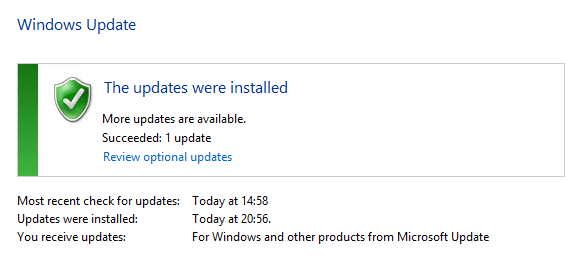
It is not possible to determine from the window when the update check was run. The expectation is that the user must refresh the page to obtain the answer, which will become impossible if refresh is removed. Nonetheless, it would seem petty to require such tasks to monitor the real-time clock and watch out for date changes.
High-level state
High-level state can be illustrated with the following screenshot:
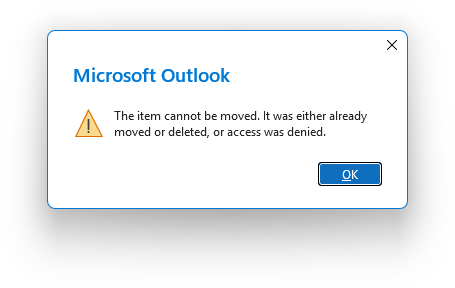
This message will be a familiar one to Outlook users and goes back many years. If you delete an e-mail message that is already open in its own window, that window doesn’t notice. If you try to delete the e-mail from the toolbar or ribbon of its own window, Outlook complains: “The item cannot be moved. It was either already moved or deleted, or access was denied.”
First off, this is classic Microsoft laziness. Outlook knows whether access was denied or not, but won’t tell you. This failing was already covered under Bug of the moment for 15/01/2011, on suggested error causes that the computer didn’t bother to check. Considering that it was me who deleted the message, Outlook also knows the answer to that possibility too.
The real issue at hand is “high-level state”. Refresh as it is understood is a “low-level” state: a state confined to a single view. The issue here isn’t that the message window needs to be “refreshed” as such, but rather that it should automatically close, or show a banner saying that it was deleted (that could even offer an undo option). File Explorer for example recognises when you delete a folder that you have open in a window, but Outlook does not recognise when you do the same thing to an e-mail message.